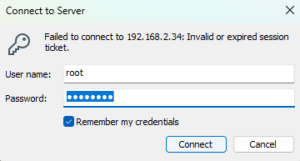
For a long time ,if user need open the virtual machine that created in the esxi host. user must open browser to access the esxi web console .
Later , esxi develop vmware remote console let user access their virtual machine don’t need open the browser.
But , I don’t know why user start the vmware remote console must need open the web console too.
So , Next is the method how to open the vmware remote console without open the browser.
You need open the virtual machine by vmware remote console in the browser too.
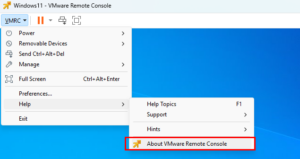
according to the figure below, open the help information
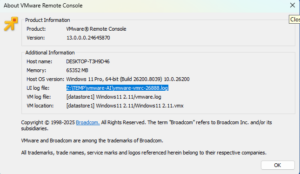
in the opening dialog, find the Ui log path
open the log form the path in step 3 and find the “vmrc://clone:xxxxxx” information
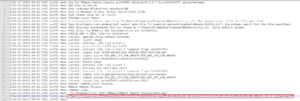
copy the information in step 4. and create an vbs script below.
1 | Set WshShell = CreateObject("WScript.Shell")` |
remember ,instead your information of my script.
Save the script to a file . Then open the file and input your esxi host’s username and password to login.