Dify is a AI tool.It can build some application ealily.
when you create a application in dify, you can access it use dify api.
the next is access dify api C# source code.
1 | using System.Net.Http; |
Dify is a AI tool.It can build some application ealily.
when you create a application in dify, you can access it use dify api.
the next is access dify api C# source code.
1 | using System.Net.Http; |
今天安装openclaw对接qq机器人遇到了一个问题,直接运行
1 | openclaw plugins install @tencent-connect/openclaw-qqbot@latest |
这个脚本,会出现下面这个提示
1 | npm install failed: |
npm 安装依赖失败,尝试了很多次都会提示这个(之前运行这个脚本就没遇到这个情况,很玄学) 。
经过了一天的折腾,找到了问题所在和解决方案
OpenClaw 的 plugins install 命令不是简单调用 npm install,而是加了多层校验:
child_process(Shell 执行)、环境变量读取等行为,即使是插件正常功能,也会触发「安全拦截」;/tmp/openclaw-plugin-*)的权限 / 生命周期管控严格,手动操作稍慢就会被自动清理。node >=24,openclaw安装脚本安装的默认版本是 v22.22.1,部分依赖编译会出现问题;gcc/g++/python,即使安装了基础编译环境,低版本系统仍可能编译失败;npm install 会因资源抢占卡住,表现为「无报错但一直卡」。1 | # 全局安装 n 工具 |
国内镜像会出现更新不同步的问题
1 | npm config set registry https://registry.npmjs.org/ |
绕过OpenClaw 插件安装机制的限制
1 | npm install -g @tencent-connect/openclaw-qqbot@latest |
等待安装好之后把 npm 安装好的包迁移到 OpenClaw 插件目录
1 | # 1. 自动定位 npm 全局安装的插件路径(兼容不同系统) |
1 | # 1. 删除 OpenClaw 旧的未完成目录 |
1 | # 1. 配置 plugins.allow 消除安全提示 |
1 | # 1.配置绑定当前QQ机器人 |
openclaw plugins list 确认加载成功。As we know OpenClaw need much tokens.
OpenClaw is Free, but token is Paid, and the paid is also very expensive.
so i found the OpenAI OAuth method. If you have OpenAI plus subscribe. This method is best .
follow next step to use openai oauth to user openclaw.
first ,you need to install openclaw:
1 | npm install -g openclaw@latest |
now set openai oauth:
1 | openclaw models auth login --provider openai-codex |
This command will open your default browser to access your OpenAI website.please login by your account. If you login in successful, copy the url and paste it into your terminal.
For complete this step ,you need a GUI ubuntu. If your vps don’t have GUI .please reference another page in this site.
if success , you will find some information like “Auth profile: openai-codex:default (openai-codex/oauth)
Default model available: openai-codex/gpt-5.4 (use –set-default to apply)”
then type next command:
1 | openclaw --profile default models set openai-codex/gpt-5.4 |
attention, the model name maybe different like me .please use your mode in the response information.
then
1 | openclaw gateway restart |
after restart openclaw, enjoey it.
For a long time ,if user need open the virtual machine that created in the esxi host. user must open browser to access the esxi web console .
Later , esxi develop vmware remote console let user access their virtual machine don’t need open the browser.
But , I don’t know why user start the vmware remote console must need open the web console too.
So , Next is the method how to open the vmware remote console without open the browser.
You need open the virtual machine by vmware remote console in the browser too.
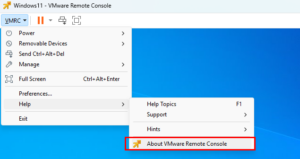
according to the figure below, open the help information
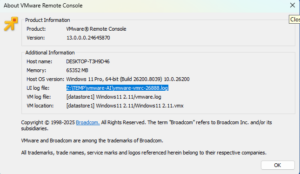
in the opening dialog, find the Ui log path
open the log form the path in step 3 and find the “vmrc://clone:xxxxxx” information
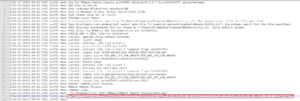
copy the information in step 4. and create an vbs script below.
1 | Set WshShell = CreateObject("WScript.Shell")` |
remember ,instead your information of my script.
Save the script to a file . Then open the file and input your esxi host’s username and password to login.
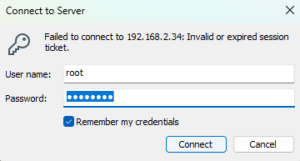
 |
Do this , what do you get ? |
|---|